
GetBySystemId in Business Central AL: when to use it, when not to use it, and why it matters
Share this Article
In this Article
- 1.What is GetBySystemId?
- 2.Syntax
- 3.A simple example
- 4.How to obtain the SystemId
- 5.The biggest advantage: stability
- 6.Using Get()
- 7.Using GetBySystemId()
- 8.A practical integration example
- 9.Recommended approach
- 10.Advantages of GetBySystemId
- 11.1. Reliable record identification
- 12.2. Better API design
- 13.3. Safer external integrations
- 14.4. Supports renumbering and migration
- 15.5. Consistent across extensions
- 16.Performance considerations
- 17.When you should use GetBySystemId()
- 18.When you should not use GetBySystemId()
- 19.1. Standard business logic
- 20.2. User-driven lookups
- 21.3. Filtering multiple records
- 22.4. Reports and list processing
- 23.Error handling best practice
- 24.A complete example
- 25.Final thoughts
Share this Article
In this Article
- 1.What is GetBySystemId?
- 2.Syntax
- 3.A simple example
- 4.How to obtain the SystemId
- 5.The biggest advantage: stability
- 6.Using Get()
- 7.Using GetBySystemId()
- 8.A practical integration example
- 9.Recommended approach
- 10.Advantages of GetBySystemId
- 11.1. Reliable record identification
- 12.2. Better API design
- 13.3. Safer external integrations
- 14.4. Supports renumbering and migration
- 15.5. Consistent across extensions
- 16.Performance considerations
- 17.When you should use GetBySystemId()
- 18.When you should not use GetBySystemId()
- 19.1. Standard business logic
- 20.2. User-driven lookups
- 21.3. Filtering multiple records
- 22.4. Reports and list processing
- 23.Error handling best practice
- 24.A complete example
- 25.Final thoughts
When working with Microsoft Dynamics 365 Business Central, most developers retrieve records using the Get() method and the table’s primary key. However, Business Central also provides a powerful alternative: GetBySystemId().
This method is often overlooked, but it becomes extremely valuable in API integrations, external applications, background processing, and scenarios where primary keys may change over time.
In this article, I’ll explain what GetBySystemId() does, how it differs from Get(), when you should use it, when you should avoid it, and provide practical AL examples.
What is GetBySystemId?
GetBySystemId() retrieves a record using the record’s SystemId, which is a globally unique identifier (GUID) automatically assigned by Business Central.
Every record in Business Central contains a SystemId field. Unlike a primary key such as "No." the SystemId remains stable and uniquely identifies the record.
Syntax
Record.GetBySystemId(SystemId: Guid): Boolean
Returns true if the record exists.
Returns false if the record is not found.
Does not raise an error when the return value is handled.
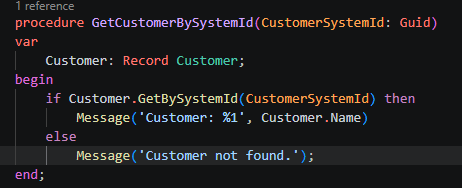
A simple example
procedure GetCustomer(CustomerSystemId: Guid)
var
    Customer: Record Customer;
begin
    if Customer.GetBySystemId(CustomerSystemId) then
        Message('Customer: %1', Customer.Name)
    else
        Message('Customer not found.');
end;
This loads the customer directly from its SystemId.
How to obtain the SystemId
You can read it from any existing record.
var
    Customer: Record Customer;
    CustomerSystemId: Guid;
begin
    Customer.Get('10000');
    CustomerSystemId := Customer.SystemId;
    Message('%1', CustomerSystemId);
end;
The returned GUID can be stored externally and used later with GetBySystemId().
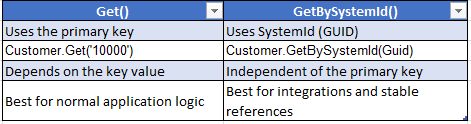
The biggest advantage: stability
Imagine this scenario.
A customer is created:
No.: 10000
Name: The Cannon Group PLC
SystemId: "428cfb33-6dab-ee11-a56d-6045bdacc749"
Later, the customer number is changed from 10000 to CUST-10000.
Now compare the two methods.
Using Get()
Customer.Get('10000');
This fails because the primary key changed.
Using GetBySystemId()
Customer.GetBySystemId(CustomerSystemId);
This still retrieves the same customer because the SystemId did not change.
This is one of the main reasons Microsoft APIs and many integration scenarios use SystemId instead of document numbers or master data numbers.
A practical integration example
Suppose an external payment application stores the Business Central customer reference.
Recommended approach
Store the SystemId.
procedure ProcessPayment(CustomerSystemId: Guid)
var
    Customer: Record Customer;
begin
    if not Customer.GetBySystemId(CustomerSystemId) then
        Error('Invalid customer reference.');

    Message('Processing payment for %1', Customer.Name);
end;
Even if the customer number changes, the integration continues to work.
Advantages of GetBySystemId
1. Reliable record identification
The SystemId uniquely identifies a record regardless of changes to the primary key.
2. Better API design
When exposing custom APIs, using SystemId creates more stable endpoints.
Example:
GET /customers({systemId})
instead of
GET /customers(10000)
3. Safer external integrations
Third-party systems can store a GUID without depending on Business Central numbering conventions.
4. Supports renumbering and migration
If records are renumbered during migration, integrations based on SystemId remain valid.
5. Consistent across extensions
Different extensions can safely reference the same record through SystemId.
Performance considerations
GetBySystemId() is optimized for lookup by SystemId.
Internally, Business Central maintains the SystemId as a unique identifier, so retrieval is efficient.
However, for standard application logic where the primary key is already available, Get() remains the simpler and more appropriate option.
When you should use GetBySystemId()
Use it when:
Building API integrations
Developing external applications
Storing Business Central references outside BC
Processing records asynchronously
Creating background jobs
Passing record references between systems
Working with immutable record identifiers
Examples include:
Payment integrations
Document processing services
Azure Functions
Power Platform integrations
Middleware applications
Event-driven integrations
When you should not use GetBySystemId()
Avoid it in these situations.
1. Standard business logic
If you already know the primary key, use Get().
Customer.Get('10000');
This is simpler and easier to read.
2. User-driven lookups
Users typically search by customer number, vendor number, item number, or document number.
3. Filtering multiple records
GetBySystemId() retrieves only a single record.
For multiple records, use filters.
Customer.SetRange(Blocked, false);
Customer.FindSet();
4. Reports and list processing
Use findfirst(), findlast(), findset() for record iteration.
Error handling best practice
Always handle the Boolean return value.
if not Customer.GetBySystemId(CustomerSystemId) then
    Error('Customer %1 does not exist.', CustomerSystemId);
Avoid calling GetBySystemId() without checking the result unless you intentionally want an error.
A complete example
procedure ShowCustomer(CustomerSystemId: Guid)
var
    Customer: Record Customer;
begin
    if Customer.GetBySystemId(CustomerSystemId) then
        Message(
            'Customer No.: %1\\Customer Name: %2',
            Customer."No.",
            Customer.Name)
    else
        Error('Customer not found.');
end;
Final thoughts
GetBySystemId() one of the most useful yet underused record retrieval methods in Business Central AL.
For everyday development, Get() is usually the right choice.
For integrations, APIs, external systems, and long-term record references, GetBySystemId() is often the better architectural decision because it provides a stable, immutable way to identify records.
As a practical rule:
Use Get() for business logic inside Business Central.
Use GetBySystemId() for integrations and external references.
Choosing the right method can make your extensions significantly more robust and reduce future integration issues caused by record renumbering or key changes.